


Inside The Box
- 1x m106 Pro Router
- 1x Power Adapter
- 1x Ethernet Cable
- 1x User Manual
- 1x Warranty Card
- 1x Wall-Mount Bracket
Couldn't load pickup availability
Standard orders are processed within 2–4 business days. Express and overnight orders are processed the same day if placed before 3PM EST.
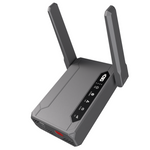
Wherever your day takes you, the m106 Pro ensures consistent cellular 4G internet for teams that can’t afford delays. Its CAT12 modem provides robust speeds, while the internal battery supports uninterrupted performance during travel or when outlets are limited. It’s an ideal choice for portable, temporary, or fast-deployment connectivity needs.
Compatible with: Verizon, AT&T, T-Mobile or your local ISP.


1. Power it up.

2. Insert Sim(s)

3. Connect your devices.

Keep sales and promos running nonstop.

Access data and report from anywhere.

Take orders, payments, and go where customers are.

Take payments and manage sales anywhere.

Demo, sell, and connect on the spot.

Stay connected for routes, tracking, and updates.

| Brief | 4g LTE Cat 12 |
| Peak Throughput | DL: 600Mbps, UL: 150Mbps |
| Antennas | 2x External, 2x Internal Full-band Antennas (600M~3.8GHz) |
| SIM Slot | 2x SIM Slots |
| Wi-Fi Standard | 802.11 b/g/n, 2x2 300Mbps (2.4GHz) |
| CPU | Qualcomm QCA9531 |
| Storage | 128MB NAND Flash |
| Battery | 5000mAh, 18.5Wh |
| Battery Life | 8 hours |
| Ethernet Ports | 1x LAN, 1x WAN |
| Certifications | FCC+DFS, CP65, PTCRB, Verizon |
| Size | 4.88 x 3.97 x 1.22 in |
| Weight | 10.56 oz |
| Mounting | Wall Mount |
| Temperature | Operating: 32 - 104°F | Storage: -4 - 113°F |
| Humidity | Operating: 5 - 95% non-condensing | Storage: 5 - 95% non-condensing |
When fully charged, the device can operate wirelessly for up to 8 hours on a single battery charge. It can also work while charging or plugged in.
Verizon, AT&T, T-Mobile or your local ISP.
Absolutely! It comes with a screw-in mounting kit, where you can mount it directly to your wall.
You can purchase a cellular plan for the device directly through your preferred carrier, or you can contact our support team, and we can assist you in setting up a plan with Verizon.
You can connect up to 32 devices making it perfect for a smaller work environment or a family RV trip.
A dual sim router allows this device to almost never go offline. If one network fails it automatically swaps to your secondary sim slot.
With the Antenna's fully extended the device is 4 inches wide and 8.75 inches high. With the Antenna's closed the device is 3.9 inches wide and 4.88 inches high. Its compact size and lightweight design make it highly portable, perfect for use in a variety of locations.
No, the antennas are not removable. However, they can be pivoted to different positions, making it easier to optimize signal strength or pack the device for travel.
Yes, with CSG View by kCLOUD you can see your devices status, manage devices, push updates, and monitor signal strength and health.
Yes, the "Power Position" is the recommended alignment for the antennas. You can watch the breakdown on Power Position here: Power Position Youtube Video
Yes, the m106 pro offers a 1 year limited warranty. You can find more info on the warranty here: CSG Hardware Warranty
Have an account?
Log in to check out faster.